
HVAC Google Ads: How to Build a Replacement Lead Campaign
HVAC Google Ads can drive steady replacement demand when the account targets replacement searches, routes each click to a matched page, and treats the booked estimate as the primary conversion. A replacement campaign should sell the estimate, screen poor-fit traffic, and give sales clear context.
Attract controls the first constraint. Many accounts blend service and replacement traffic and push the problem to dispatch. Segment AC replacement, furnace replacement, and heat pump replacement into focused campaigns with matching ad copy, matching landing pages, and call tracking.
Start with the Replacement Buyer
A replacement buyer often has an aging system, a major failure, poor comfort, high utility costs, or a planned upgrade before peak weather. ENERGY STAR offers guidance on when to replace heating and cooling equipment, including older systems that merit evaluation [1]. A search for “furnace replacement cost” shows different intent than “AC repair near me.”
Sort searchers by likely job. Prioritize terms that include “replace,” “replacement,” “new system,” “installation,” “cost,” “estimate,” and “quote.” Repair terms can produce replacements, but they require separate controls.
Build the campaign around three decisions.
- The search term must signal replacement or installation intent.
- The ad must match system type and service area.
- The landing page must qualify the homeowner before the booking request reaches the team.
This keeps the account focused on booked replacement estimates from qualified homeowners in the service area.
Build the Campaign Segments Before You Write Ads
Segment before you write copy. Mixing AC, heat pump, furnace, repair, maintenance, tune-up, and brand terms in one campaign burns budget and clouds lead data. Clear segments give budget control and cleaner attribution.
Use names that tell your team exactly what each campaign buys. Keep each campaign narrow so budget, ad copy, and landing page align.
| Campaign | Ad group theme | Search intent | Landing page | Main tracked action |
|---|---|---|---|---|
| Search AC Replacement Core Metro | AC replacement cost | Homeowner pricing a new cooling system | AC replacement estimate page | Booked replacement estimate |
| Search Heat Pump Replacement Core Metro | Heat pump replacement | Homeowner comparing upgrade paths | Heat pump estimate page | Booked replacement estimate |
| Search Furnace Replacement Core Metro | Furnace replacement cost | Homeowner facing old furnace or breakdown | Furnace estimate page | Booked replacement estimate |
| Search Emergency System Replacement | replace HVAC system fast | Homeowner with failed equipment | urgent replacement estimate page | Same-day estimate request |
| Search Brand Replacement | company name plus replacement | Homeowner checking your company directly | replacement estimate page | Call or form booking |
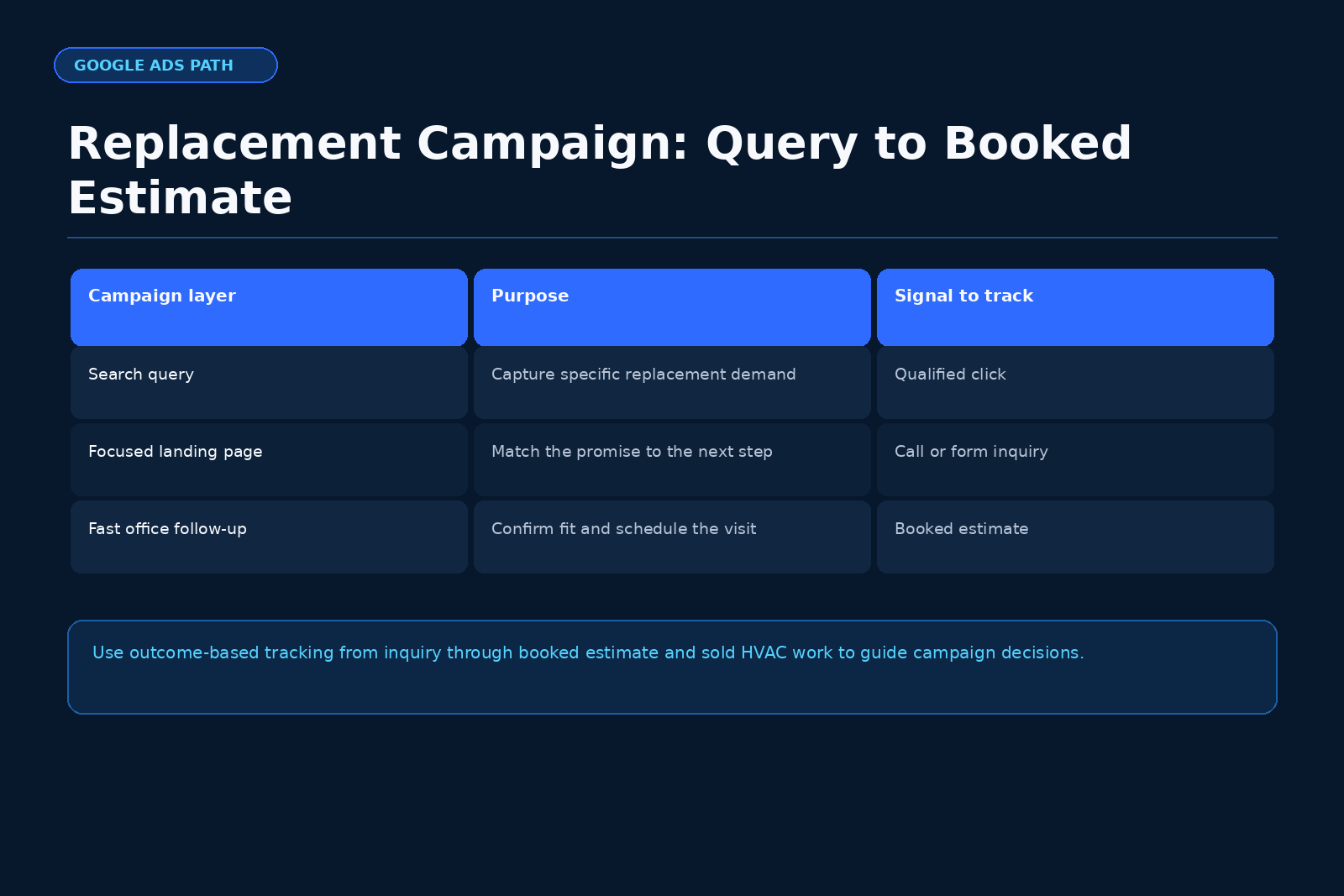
Launch with phrase match and exact match when the account lacks clean query history. Consider broad match only after you have reliable booked-estimate conversion tracking. Launching broad without strong tracking often teaches the account to chase cheap, low-quality calls.
Separate Replacement Intent from Repair Intent
Replacement intent terms include:
- “AC replacement cost”
- “replace central air conditioner”
- “new heat pump installation”
- “heat pump replacement estimate”
- “furnace replacement near me”
- “new HVAC system quote”
- “replace old HVAC system”
- “high efficiency furnace installation”
Place repair intent terms in a separate campaign with its own budget and page. A repair searcher often wants a diagnostic first. A replacement searcher often accepts an estimate appointment faster. Use separate landing pages so the replacement page makes the estimate the primary action.
Use Negative Keywords with Discipline
Negative keywords protect budget and your call team from poor-fit clicks. Start with these categories:
- DIY: how to, parts, wiring diagram, manual
- Jobs: hiring, salary, technician jobs, apprentice
- Warranty research: warranty lookup, serial number, manufacturer warranty
- Parts: capacitor, blower motor, ignitor, contactor
- Apartment or rental: landlord, apartment, tenant
- School research: course, training, certification class
- Used equipment: used furnace, used AC unit, second hand
- Free-only intent: free unit, free furnace program
Review search terms at least twice per week during launch. Add negatives from real queries. Maintain a shared negative list across replacement campaigns, and keep campaign-level negatives where needed. If your team monetizes repair-to-replacement well, run a separate repair campaign for that path and keep replacement campaigns protected.
Write Ads That Qualify the Estimate
Ad copy must match the search and set expectations. Use substantiated claims. FTC guidance requires truthful advertising and prohibits deceptive claims [4]. Avoid absolute promises about savings, approvals, incentives, or availability.
A strong replacement ad:
- Names the system type.
- Names the service area.
- Promotes the estimate booking.
- Avoids absolute claims.
Sample AC replacement headlines:
- AC Replacement Estimates
- Replace Your Central AC
- Local AC Install Team
Sample heat pump headlines:
- Heat Pump Replacement
- New Heat Pump Estimates
- Replace Your Heat Pump
Sample furnace headlines:
- Furnace Replacement Quote
- Replace Your Old Furnace
- New Furnace Estimates
Sample description:
“Book a replacement estimate for your home comfort system. Local HVAC team. Clear next steps. Call or request a time online.”
State financing and rebates as overviews without guarantees. Eligibility depends on equipment, credit, timing, and location.
Build the Landing Page Around Qualification
A replacement landing page converts qualified intent into booked estimates. It should not act as a general brochure.
Use this layout.
- Headline that matches the ad and system type.
- Subhead that names the service area.
- Call button and estimate request form above the fold.
- Three bullets about what the estimate includes.
- System age and issue selector.
- Ownership and address or ZIP qualification.
- Financing overview with no approval promise.
- Installation process summary, trust items you can verify, and a second call-to-action.
Use clear form fields:
- Name
- Phone
- Street address or ZIP code
- System type
- System age range
- Main issue
- Preferred appointment window
- Homeowner confirmation
Keep the page fast on mobile. Topic research supports dedicated, fast-loading mobile pages with clear calls to action and tracking [2]. Add qualifying language such as:
“Request a replacement estimate if you own the home, the system serves a property in our service area, and you want options for replacing the equipment.”
Track the Events That Matter
Do more than count form submissions and phone calls. Track the funnel through booked estimates and, when possible, sold jobs. Google Ads supports conversion tracking and offline conversion imports so you can send later funnel events back into the platform [2].
Track at least these events:
- Form submission
- Phone call from ad
- Phone call from landing page
- Booked replacement estimate
- Completed estimate
- Sold replacement job
Use the booked replacement estimate as the primary quality signal. A short parts-pricing call or a bad-form lead should not weigh the same as a confirmed in-home estimate. Offline imports work best when your CRM captures the Google Click ID (GCLID) and your intake process tags job type, system type, booked status, and outcome.
Worked Illustrative Calculation: Replacement Lead Economics
This calculation uses simple figures to show how campaign economics work. Replace each input with your company’s real data.
Assume the following month:
- Ad spend: $8,000
- Average cost per lead: $160
- Leads generated: 50
- Qualified replacement leads: 60 percent
- Booked estimate rate from qualified leads: 70 percent
- Close rate from booked estimates: 35 percent
- Average replacement ticket: $12,000
Calculation:
Leads generated equals ad spend divided by cost per lead.
$8,000 ÷ $160 = 50 leads
Qualified replacement leads equal total leads multiplied by qualified rate.
50 × 60 percent = 30 qualified replacement leads
Booked estimates equal qualified leads multiplied by booking rate.
30 × 70 percent = 21 booked estimates
Sold jobs equal booked estimates multiplied by close rate.
21 × 35 percent = 7.35 sold jobs
Projected sold revenue equals sold jobs multiplied by average ticket.
7.35 × $12,000 = $88,200 projected sold revenue
This model is illustrative. It does not predict your result. Replace cost per lead, qualification rate, booking rate, close rate, and average ticket with CRM data. The math shows that booked replacement estimates drive outcomes more reliably than raw lead counts.
Budget Around the Service Area and Season
Match budget to service area, season, and crew capacity. A company with one open install slot needs less spend than a company with multiple crews ready.
Set daily budgets by system type and season. During cooling demand, AC replacement often merits more spend; during heating demand, furnace replacement often does. Heat pump campaigns can run year-round in markets where homeowners compare system types.
Use location targeting by service area. Exclude unprofitable regions. Split out ZIPs that perform differently so you can adjust bids and budgets.
Track weekly:
- Spend by campaign
- Leads by campaign
- Qualified replacement leads
- Booked replacement estimates
- Completed estimates
- Sold replacements
- Cost per booked estimate
- Cost per sold replacement
Cost per booked estimate gives an early read; cost per sold replacement confirms final performance.
The Handoff to Convert
Attract only works when Convert moves fast. Replacement clicks become revenue when intake answers promptly, qualifies, books, and follows up on open quotes. Scale Your Offers defines Convert as speed to lead, qualification, booking, and quoted-job follow-up [7]. A Workato lead response study cites prior Harvard Business Review research showing steep declines in qualification odds when response time slips from five to ten minutes; treat this as directional guidance for HVAC response discipline [8].
Handoff process for each paid search replacement lead:
- Call within five minutes when the form arrives.
- Send a text after the call attempt.
- Confirm service area and homeowner status.
- Confirm system type, system age, and main issue.
- Offer the earliest estimate windows.
- Assign the lead source and campaign in the CRM.
- Send appointment confirmation by text and email.
- Follow up on unbooked leads the same day.
- Follow up on open estimates until you reach a clear outcome.
Use call recordings and form data to optimize targeting, ad copy, and page language. If many booked estimates no-show, tighten confirmations and reminders.
For owners who want a paid-ads system that links ads, funnel, tracking, and follow-up, read The Booked-Out Contractor, a $2.95 book. Scale Your Offers describes it as a 75-page resource with six free tools and a 30-day “Read It, Keep It” guarantee [5].
A.C.E. for HVAC Google Ads Replacement Campaigns
Attract is the first constraint when an HVAC company lacks steady replacement demand. A tight Google Ads build brings replacement and maintenance buyers into the system, which matches the Attract definition used by Scale Your Offers [7].
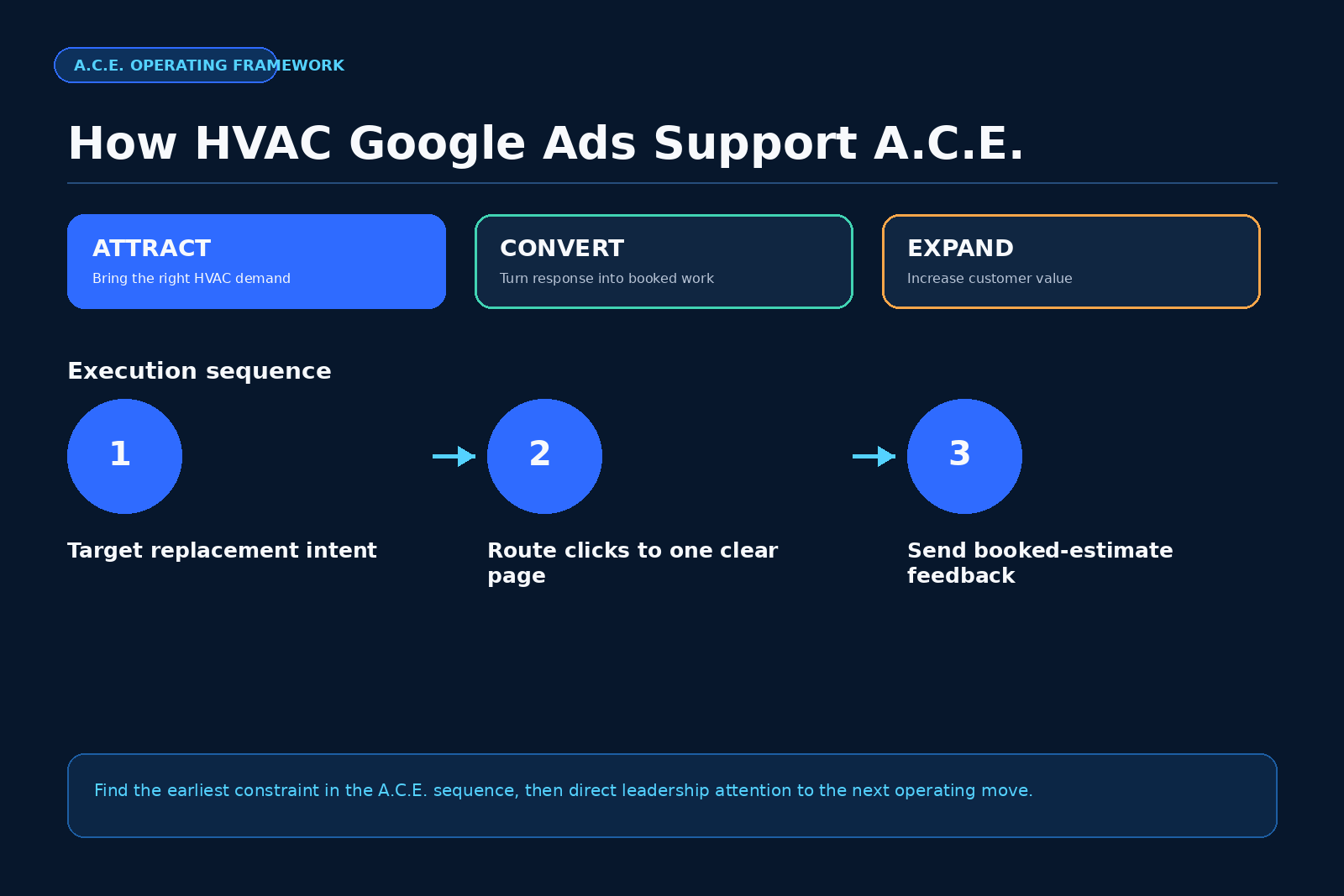
Attract
Attract includes search campaigns, keywords, ad copy, landing pages, tracking, and service-area targeting. Use these operating checks:
- Each campaign targets one system type and one intent.
- The landing page matches the search term and ad.
- Tracking captures booked replacement estimates, not only raw leads.
Fix gaps before you raise budget.
Convert
Convert starts the moment the lead arrives. The call team owns response speed, qualification, booking, presentation, and estimate follow-up. Even strong campaigns fail when intake lags.
Track a Convert scorecard:
- Speed to first call
- Contact rate
- Qualified rate
- Booked estimate rate
- Show rate
- Close rate
- Open estimate follow-up rate
Use The Fastest Money for response speed, replacement estimates, and database reactivation guidance [7].
Expand
Expand activates after the core lead and sale path works. It covers maintenance agreements, referrals, indoor air quality, repair-to-replacement, and database reactivation [7]. Feed every sold replacement into maintenance. Nurture unsold estimates. Educate repair customers with aging equipment about replacement paths.
This order compounds results: Attract brings demand, Convert books and sells work, Expand grows revenue per customer.
Operating Checklist for Launch
Use this framework before you scale spend.
- Pick one system type for the first campaign.
- Pick one service area with strong install margins.
- Build one landing page for that system type.
- Write ads that match the system type and service area.
- Launch exact and phrase match terms first.
- Add negative keywords before launch.
- Track calls, forms, and booked estimates.
- Confirm CRM fields for source, system type, and outcome.
- Train the call team on replacement qualification.
- Review search terms twice per week.
- Review booked estimates weekly.
- Shift budget toward campaigns with better cost per booked estimate.
Common Mistakes That Waste Replacement Ad Spend
- Sending paid traffic to the homepage creates a mixed message. Use a focused replacement page.
- Treating every call as equal in conversion tracking.
- Using broad location targeting without exclusions.
- Overpromising rebates, savings, or financing; follow FTC truth-in-advertising guidance [4].
- Ignoring the call team’s speed, qualification, and follow-up.
- Changing targeting and budgets so often that data never stabilizes.
FAQ
How much should an HVAC company spend on Google Ads for replacement leads?
Start with a budget large enough to produce a useful sample of clicks and leads for one system type and one service area. The right amount depends on market cost, service area size, install capacity, and close rate. Use cost per booked replacement estimate as the main early metric.
Should an HVAC replacement campaign include repair keywords?
Use a separate campaign for repair terms. Some repair calls turn into replacements, but they need a different call path and landing page. Keep replacement campaigns focused on searches that signal new equipment, replacement cost, or installation intent.
What should the landing page say for HVAC replacement traffic?
The landing page should name the system type, service area, estimate process, homeowner fit, and next appointment action. It should ask for system type, age range, main issue, address or ZIP code, and contact details. It should avoid unsupported savings, rebate, or financing promises.
What is the best conversion to track in HVAC Google Ads?
Track forms and calls, then send booked replacement estimates back as the main quality signal when your CRM can do it. Google Ads supports conversion tracking and offline conversion imports through its documented conversion tools [2].
If your HVAC Google Ads account buys mixed traffic, raw leads, or untracked calls, start with an ACE Audit. Scale Your Offers can review the Attract setup, the Convert handoff, and the Expand path so the replacement campaign has a clear route from search click to booked estimate.
References
- ENERGY STAR, “When is it time to replace your heating and cooling system?”
- Google Developers, “Conversion tracking overview and implementation,” Google Ads API Documentation
- Air Conditioning Contractors of America, “Quality Standards and Technical Manuals”
- Federal Trade Commission, “Advertising and Marketing Business Guidance”
- Scale Your Offers, “The Booked-Out Contractor”
- Scale Your Offers, “Lead Flow Score”
- Scale Your Offers, “The Fastest Money”
- Workato, “Lead Response Time Study”